
The path can become the whole action.
A missing key selection turns a local check into a long calculation—especially painful when every evaluation crosses constraints, IK, drivers, and a production rig.
Responsive motion paths for Blender
Cloto guards the useful frame range before Blender calculates, then turns the exact result into a faithful proxy that follows complex rigs interactively in real time.
Guarded key rangeComplex-rig friendlyReal-time response
Less time managing motion paths. More time bringing your characters to life.


Blender's selected-key range is fast when the right keys are selected. Forget that step and a motion path can cover far more animation than intended.
A missing key selection turns a local check into a long calculation—especially painful when every evaluation crosses constraints, IK, drivers, and a production rig.
Choose a range around the current frame. Cloto selects only the relevant keys for the selected controls, calculates that interval, and restores your original selection.
The initial proxy comes directly from Blender's evaluated motion path. From there, Cloto keeps the viewport responsive with a close interactive approximation.
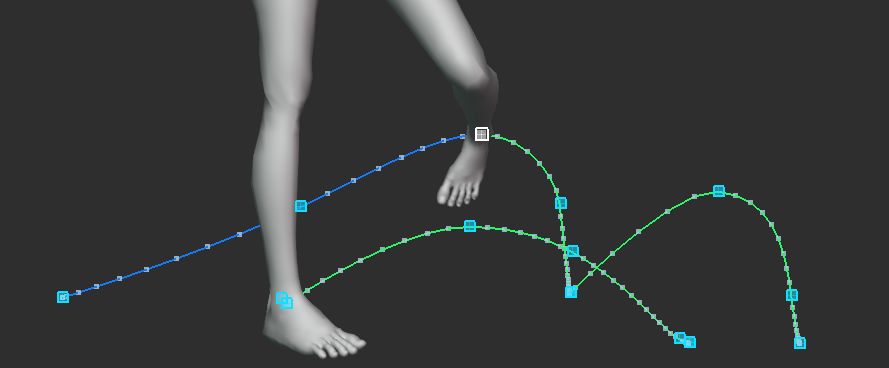
See the arc. Pull the key. Shape the motion.
Cloto asks Blender to evaluate the guarded range, then copies those native points. The proxy begins as the real Blender result, not a guessed curve.
Move the control and the proxy responds immediately. When Auto Key creates a key, or you delete keys in the Dope Sheet, Cloto recalculates only the exact section their neighbors can affect.
Once copied, native paths are cleared from the armature so a leftover path cannot quietly re-enable Blender's costly recalculation.
Constraints, IK, animated parents, and drivers make exact evaluation expensive. Cloto uses Blender for the authoritative capture and a lightweight world-space response for the interactive moment.

Blue and green mean exact, orange means an interactive approximation, and red tells you the path needs a fresh capture.
After capture, hover a cyan pixel square until it turns white and pull it directly in the viewport. Cloto verifies the evaluated rig, replaces that XYZ location key, refreshes the exact path, and stays ready for the next drag.
Select controls and visualize their parent, constraint-target, object-transform, and driver relationships. Copy the full report when you need to inspect non-spatial dependencies too.
Cloto puts the expensive evaluation behind deliberate actions and keeps the common animation loop light.
Place the playhead near the keys you care about, select the controls, and choose the frame margin around the current time.
Cloto guards the keys, asks Blender for the exact path, copies it, and removes the native calculation from the rig.
Work with the live approximation, create or delete keys through Blender, or drag a cyan key square directly. Enable optional transform refresh when you also want existing keyed transforms to recalculate their smallest safe exact section.

Your motion-path controls, together in Blender.
View full sizeThe distinction is deliberate: capture and refresh are evaluated by Blender; interactive deformation is a fast visual approximation.
It protects the calculation range, preserves native results as proxies, and updates those paths as selected controls move.
On constrained or driven rigs, the live path is intentionally approximate. Refresh Exact whenever the final evaluated trajectory matters.
Cloto
See the complete workflow, status colors, exact refresh, and native restore.